

Designing mass payouts for mobile crypto teams
Crypto Office users paid team members and external partners through individual crypto transfers. I proposed and designed a mobile batch-payment workflow covering recipient preparation, funding, review, and recovery from errors. After launch, I proposed spreadsheet import in response to user feedback; the update received positive responses from users who had struggled to copy their payout lists.
- Product
- Crypto Office · Telegram Mini App
- My role
- Sole Product Designer · end-to-end design
- Team
- PM, frontend and backend engineers, CTO
- Design
- Initial release: approximately 1–2 weeks
Import update: approximately 1 week - Status
- Shipped
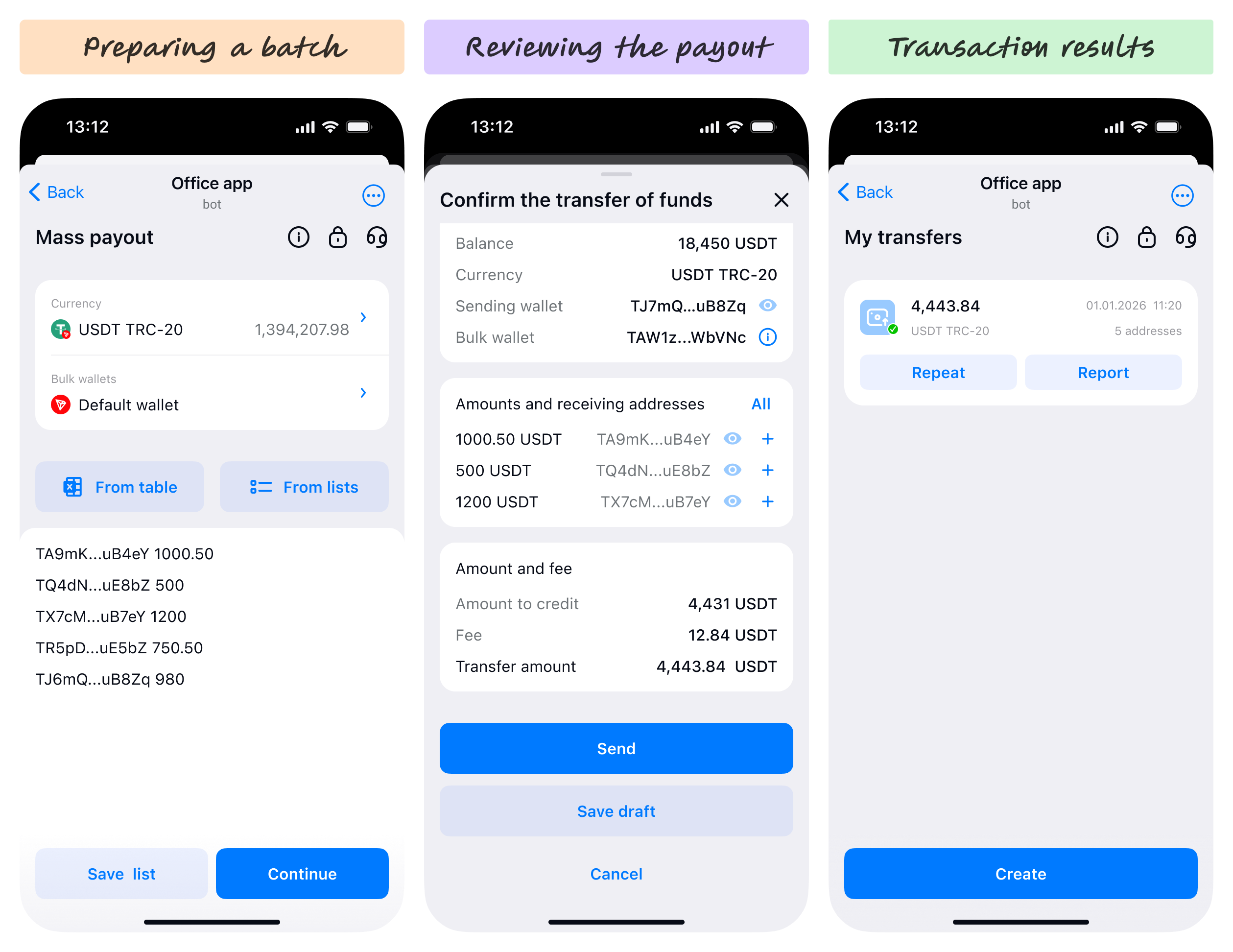
From individual transfers to a batch workflow
Saved contacts made wallet addresses easier to reuse, but users still had to configure each payment separately. Stakeholders discussed my mass payout proposal with some of our largest users, and we agreed to develop it.
The design challenge was to make a large payout manageable on a small screen: users needed to assemble recipients, choose funding sources, correct problems, and inspect the financial details before sending.
Preparing a batch without losing context
Payout preparation involved several supporting decisions, including selecting wallets, choosing a currency, and reusing recipient lists. I considered separate screens for these settings, but chose contextual bottom sheets so users could make a selection and return directly to the payout they were preparing.
The first release supported typing or pasting addresses and amounts, as well as saving recipient lists for reuse. Saved lists could be edited and updated or saved as a new list, supporting recurring payments without rebuilding the recipient data each time.
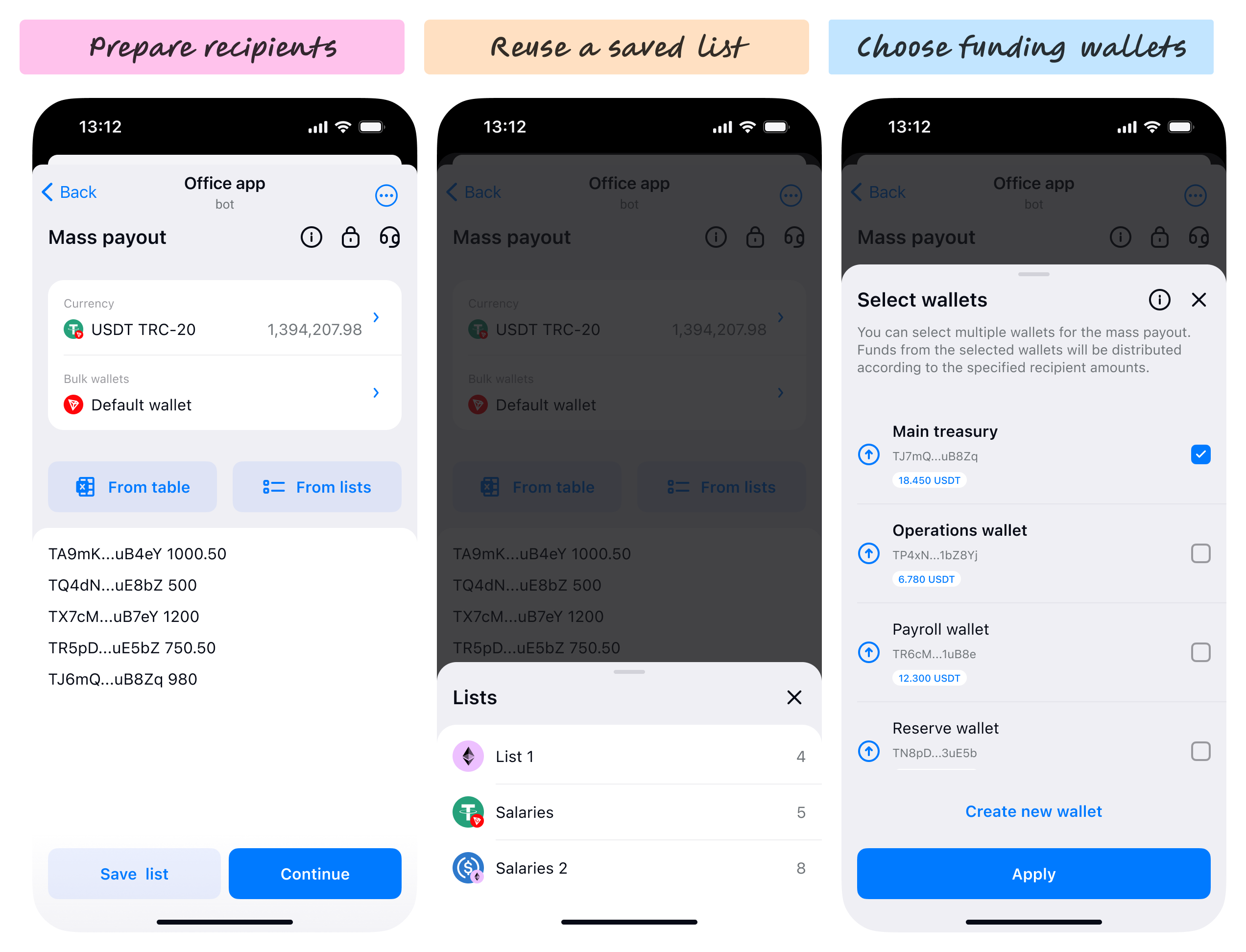
Long wallet addresses competed with payment amounts for limited horizontal space. I shortened addresses in the recipient list to a beginning-and-ending format, such as xxxxx…xxxxx, so the address and amount could fit on one line. This kept the list compact enough to scan on mobile. When the input field was active, addresses expanded to show their full values.
Teams could also fund a payout from multiple wallets. Engineering defined the intermediate payout-wallet mechanism, which collected funds before distribution. I designed how users selected source wallets and reviewed their combined amount, making that funding structure understandable in the interface.
Recovering without rebuilding the payout
The recipient list kept validation within the preparation flow. Invalid addresses, incorrect or missing amounts, and addresses incompatible with the selected network were highlighted for correction. Empty rows were ignored, so unused spreadsheet rows did not create unnecessary errors.
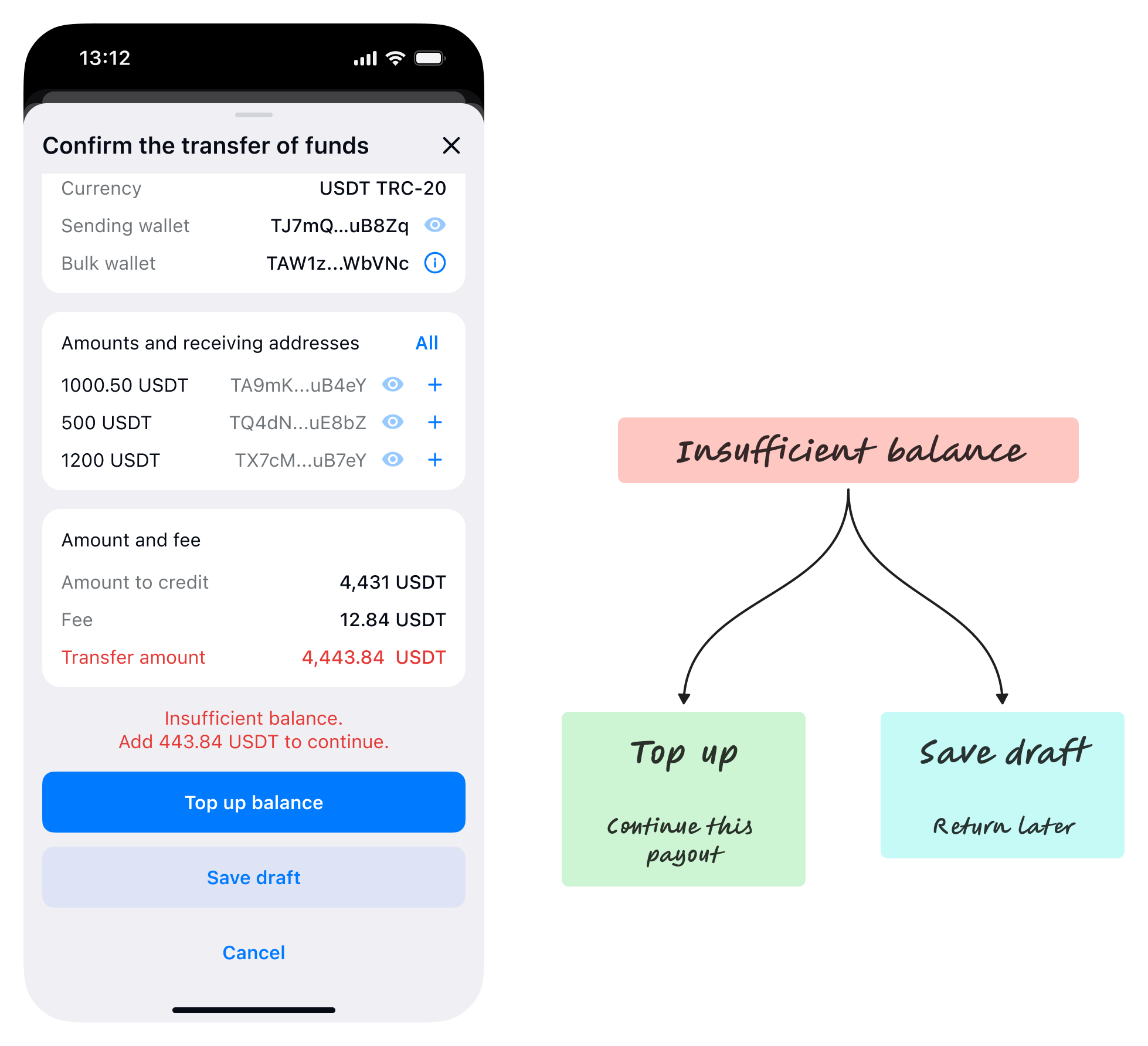
Insufficient funds required a different response. A user could discover the balance problem after already preparing a substantial recipient list.
My initial design offered only a top-up action. After discussing interrupted workflows with the PM, I added the option to save the payout as a draft. The revised design supported two paths:
- Funds can be added now: top up and continue the prepared payout.
- Funds are unavailable for now: save a draft and return to it later.
This change treated a funding problem as a possible pause in the task, rather than assuming the user could resolve it immediately.
Reviewing the payout before sending
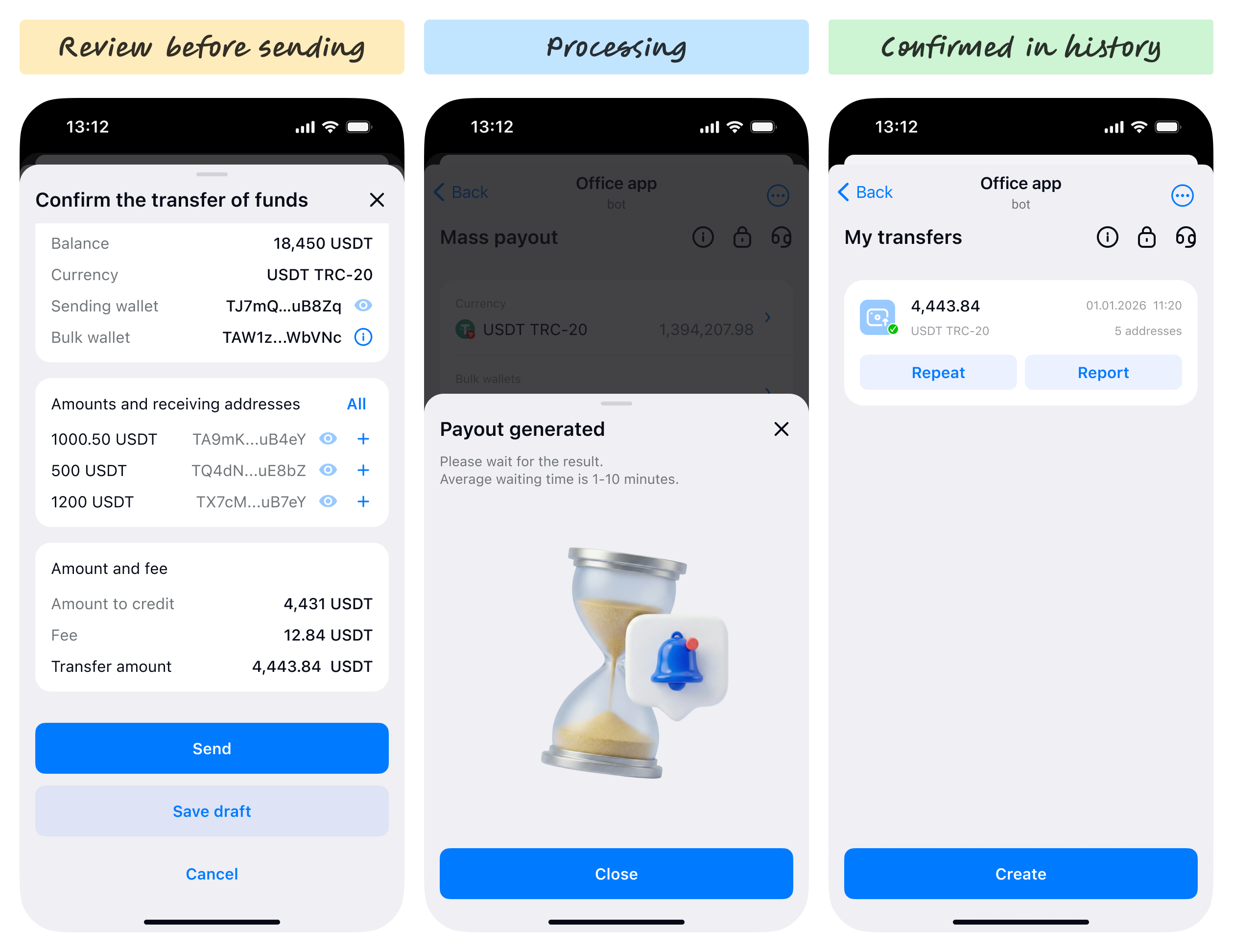
Before confirmation, users could review the selected currency, source wallets, intermediate payout wallet, recipient addresses and amounts, total payout amount, and commission in one place. Tapping “All” in the “Amounts and receiving addresses” section opened the list of full addresses and their corresponding amounts.
After confirmation, the interface showed that the payout had been created and that blockchain processing was still underway. Transfer history contained both confirmed and unsuccessful payouts, giving users a place to inspect results after processing.
Testing and implementation
I reviewed the prototype with the PM and primary stakeholders using actual payout lists. Our company, APD, paid salaries in crypto, so these internal testers had direct experience with the task.
During implementation, I worked closely with frontend and backend engineers, answered behavior questions, and checked implemented error states. I also refined icons and components and added states as implementation exposed details that needed clarification.
Adapting recipient entry after launch
After the first release, the support team shared feedback from approximately 15 frequent users working in teams of 50–100 members. I also read their messages myself. They maintained payout lists of roughly 50–100 addresses and amounts in spreadsheets, and found copying that data into the payout input inconvenient.
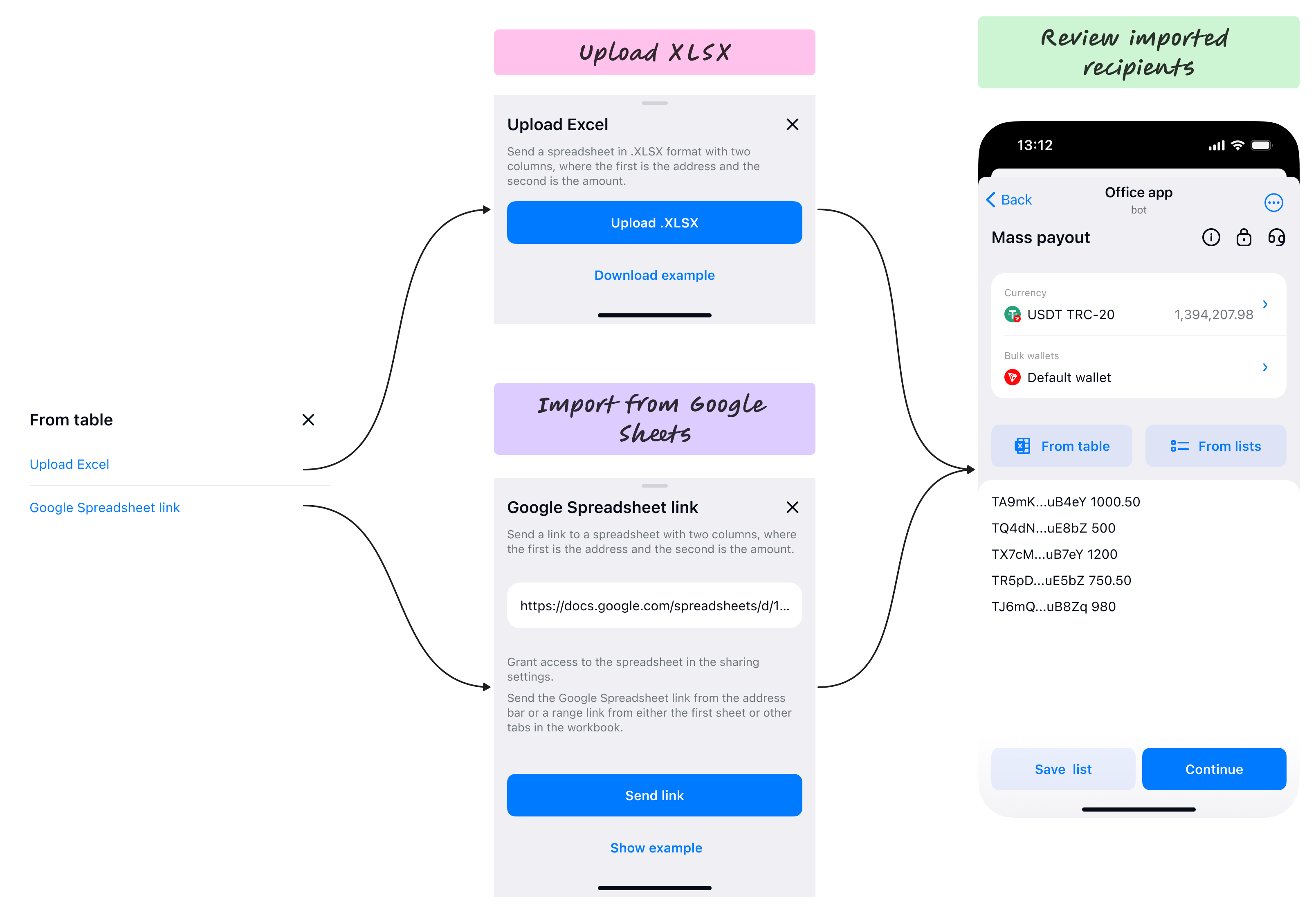
Saved lists supported reuse within Crypto Office, but these users were already maintaining their payment data elsewhere. I proposed spreadsheet import so they could bring that existing data into the payout workflow.
The follow-up release added XLSX upload and import through a Google Sheets link. I spent approximately one week designing this update, building on the existing recipient-entry flow.
Delivery and feedback
Mass payout shipped to all users after internal testing. It replaced the need to configure each payment individually, and the subsequent import update supported users who maintained their payout data in spreadsheets.
After the import update, I personally read positive messages from users who had reported difficulty copying their payout lists, also reflected in support-team summaries. This feedback was qualitative; completion time and error rates were not measured. A next evaluation would compare preparation time and successful list entry for 50–100-recipient payouts using manual entry and spreadsheet import.